Desktop production app

4ALL Encoder

4ALL Encoder is a local production application for creating captioned contribution streams. It captures supported Blackmagic DeckLink or UVC video, encodes H.264 video with AAC audio, inserts configured 4ALL captions as CEA-608/708 data, and sends one or more outputs over RTMP, RTMPS, SRT, or RIST. A downstream decoder test is required to confirm caption preservation.

Get the latest app

Last updated

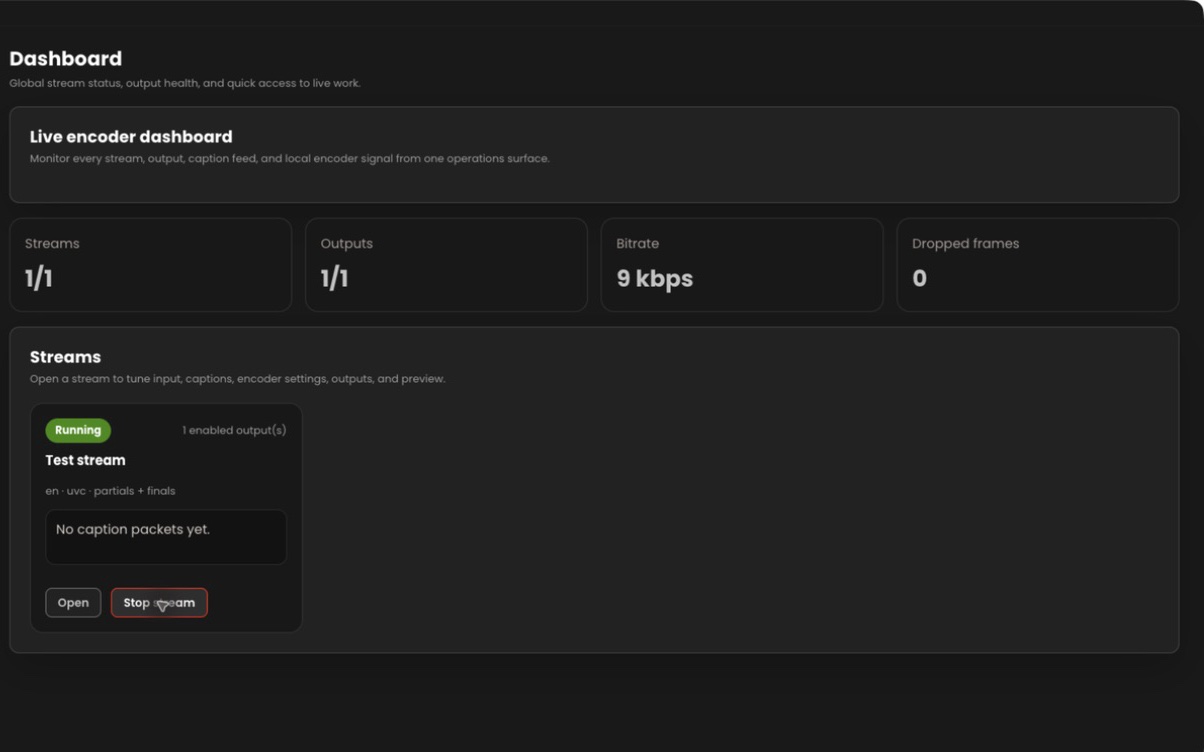
4ALL Encoder dashboard with video preview and output status

What it is

A production workflow, not a one-size-fits-all promise.

Encoder joins four responsibilities in one monitored pipeline: video and audio capture, encoding, caption insertion, and network output. Operators select the workspace and event, configure the input and encoding settings, add destination-specific outputs, and validate with the real receiver. Blackmagic inputs require the vendor’s Desktop Video driver.

Best for

  • Contribution feeds that need embedded CEA-608/708 captions in H.264
  • Productions using supported Blackmagic DeckLink or UVC video capture
  • Teams sending one encoded source to RTMP, RTMPS, SRT, or RIST destinations
  • Operators with access to a downstream caption-capable decoder for verification

Plan around

  • Documented CEA-608/708 insertion is available for supported H.264 output workflows.
  • Blackmagic hardware requires the appropriate vendor Desktop Video driver.
  • A connected destination does not prove captions survived downstream transcoding or distribution.

Capabilities and outputs

What the workflow actually delivers

The exact configuration depends on the event, audience destination, enabled features, and downstream production equipment.

Capabilities for 4ALL Encoder
CapabilityWhat it means in production
Video captureUse supported Blackmagic DeckLink or UVC video inputs, with test pattern and tone for preflight.
EncodingConfigure H.264 video, AAC audio, low-latency presets, hardware acceleration where supported, and lip-sync offset.
Caption insertionEmbed the selected 4ALL event captions as CEA-608/708 data in the H.264 stream.
Multiple outputsCreate and manage one or more RTMP, RTMPS, SRT, or RIST destination outputs.
Pipeline monitoringPreview, start, monitor, stop, troubleshoot, and collect diagnostics for the encoder pipeline.

Production workflow

From source audio to a verified audience output

  1. Step 01

    Verify the workstation

    Install current drivers and confirm video input, GStreamer components, and available hardware acceleration.

  2. Step 02

    Build the stream

    Select the 4ALL workspace and event, video input, audio, H.264 settings, and caption service configuration.

  3. Step 03

    Add destination outputs

    Configure the required RTMP, RTMPS, SRT, or RIST receiver details and security parameters.

  4. Step 04

    Decode the live result

    Start a preflight stream and use a downstream decoder to inspect video, audio, timing, and the embedded captions.

Questions buyers and producers ask

Frequently asked questions

What video inputs does 4ALL Encoder support?

The documented workflows cover supported Blackmagic DeckLink and UVC video inputs. Compatibility, drivers, format, and workstation performance must be verified for the production.

Which output protocols are available?

4ALL Encoder documents RTMP, RTMPS, SRT, and RIST outputs. Each destination has its own connection and receiver settings.

Does Encoder burn captions into the picture?

Its documented embedded-caption workflow inserts CEA-608/708 data into supported H.264 streams. That differs from rendering visible caption text into the video pixels.

Can one Encoder stream have multiple destinations?

The application supports creating and managing multiple outputs. Workstation, network, encoding, and destination capacity must still be validated under production load.

How should embedded captions be tested?

Send the actual encoded output through the intended path and inspect it with a downstream decoder or player that exposes the configured caption service.
Plan the complete audience path before show time.

Start with a free workspace or talk with 4ALL about capacity, outputs, integrations, and production support.

Get the latest app