Personal browser access

QR-code live captions for event audiences

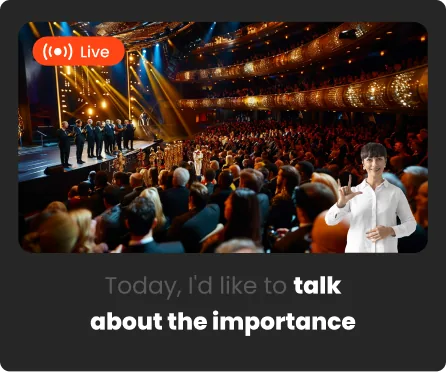
QR-code live captions let an attendee scan a code and open an event’s 4ALL viewer in a modern browser. No operator account is required for the audience member. The producer controls which languages and experiences are available, while each viewer can choose supported text, color, screen-wake, spoken-caption, and human ASL picture-in-picture settings on their own device.

Start for free

Last updated

Live event captions and human-interpreted ASL delivered by 4ALL LIVE

What it is

A production workflow, not a one-size-fits-all promise.

A QR code reduces audience friction, but it does not remove the need for access planning. Producers should publish the code where it can be scanned, provide a clickable link as a fallback, verify venue connectivity, explain available languages, and retain a shared-screen or staffed alternative for guests who cannot use a personal device.

Best for

  • Conferences and festivals offering captions without distributing dedicated displays
  • Multilingual audiences that need individual language selection
  • Hybrid and remote viewers joining from a personal device
  • Events combining text, spoken options, and human ASL access in one viewer

Plan around

  • Audience access depends on a compatible device, modern browser, network connection, and the event’s sharing configuration.
  • A QR code should be paired with a readable short link and an accessible fallback.
  • Personal browser captions do not embed CEA-608/708 data into a program stream.

Capabilities and outputs

What the workflow actually delivers

The exact configuration depends on the event, audience destination, enabled features, and downstream production equipment.

Capabilities for QR-code live captions for event audiences
CapabilityWhat it means in production
Scan or click to joinOpen the event viewer from a producer-shared QR code or direct link.
No operator accountAllow audience members to enter the shared viewer experience without an operator login.
Personal languageChoose among the text languages that the producer has made available.
Readability controlsAdjust supported text, color, and screen-wake settings on the individual device.
Additional access modesUse enabled spoken-caption controls or human ASL picture-in-picture from the same viewer context.

Production workflow

From source audio to a verified audience output

  1. Step 01

    Configure the viewer experience

    Enable the correct event, languages, access modes, and sharing settings before publishing the link.

  2. Step 02

    Generate and place access points

    Put the QR code and a readable direct link on signage, slides, event pages, and attendee communications.

  3. Step 03

    Test as an attendee

    Join on representative phones and browsers over the venue network and verify language and access controls.

  4. Step 04

    Provide an assisted fallback

    Brief staff and maintain a shared display or other appropriate option for guests who need help or cannot use BYOD.

Questions buyers and producers ask

Frequently asked questions

Do attendees need to install an app?

No dedicated audience app is required for the documented viewer workflow. Attendees open the shared link or QR code in a modern web browser.

Do viewers need a 4ALL account?

No operator account is required to use a properly shared audience viewer. Producers and event operators manage access and configuration separately.

Can every attendee choose a different language?

Yes. Each viewer can choose among the languages the producer has enabled and made available for that event.

What if a guest cannot scan the QR code?

Provide the direct viewer link in readable form and train event staff to assist. An appropriate shared-screen or managed alternative should also be planned for guests without a usable device or connection.

Can the QR viewer include ASL?

When the event’s human ASL workflow is enabled, supported viewer controls can present interpreter video in picture-in-picture alongside the caption experience.

Plan the complete audience path before show time.

Start with a free workspace or talk with 4ALL about capacity, outputs, integrations, and production support.

Start for free