How does 4ALL translate a live event?+
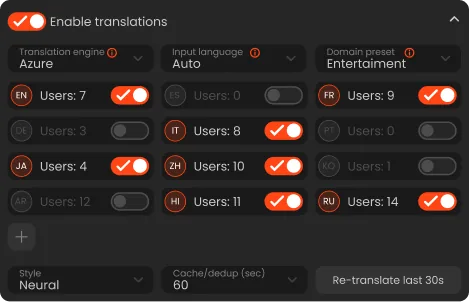
The event first creates source-language captions from audio. When translation is enabled, configured target languages are generated from that caption workflow and can be exposed to viewers or selected outputs.
Can attendees select their own language?+
Yes. The browser viewer can present the languages that the producer has enabled for the event, allowing each attendee to choose an available option.
Can event names and brands be protected from translation?+
Producers can use glossary and do-not-translate controls to guide how event-specific terms are handled. Those controls improve consistency but should still be tested with representative speech.
Does live translation include audio?+
Not automatically. Translated text can be paired with standard spoken captions or low-latency spoken translation when those features are enabled and configured.
Is live machine translation error-free?+
No. Results depend on the source caption, context, language pair, terminology, and settings. Critical programs should use a documented review and fallback plan appropriate to their requirements.