Desktop production app

4ALL Signal

4ALL Signal is a local audio-routing application for 4ALL low-latency translated speech. Operators add an LL-TTS event language as a source, build a visual pipeline, apply documented gain, dynamics, delay, noise-suppression, metering, and routing controls, then send the result to physical, virtual, or supported network audio outputs. Signal does not provide the venue’s RF listening hardware.

Get the latest app

Last updated

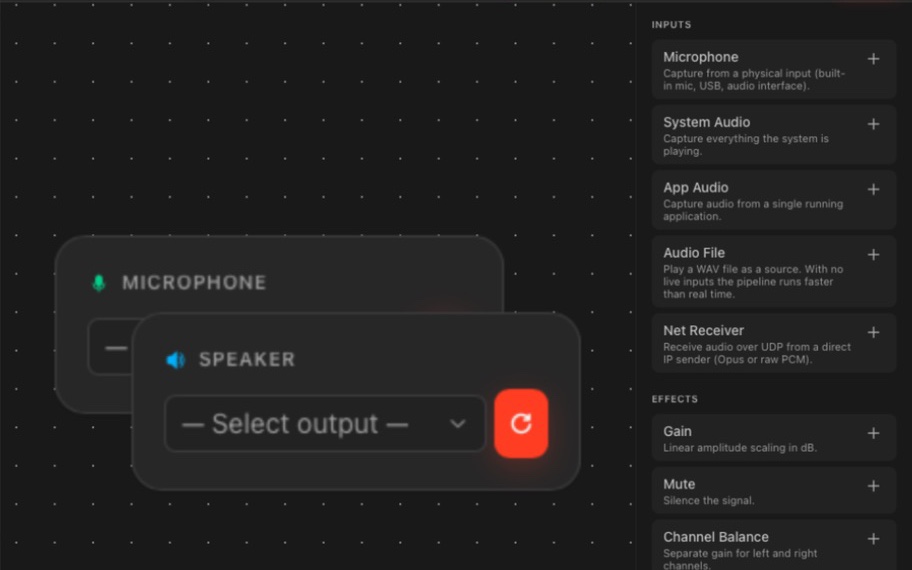
4ALL Signal visual routing canvas with microphone and speaker nodes

What it is

A production workflow, not a one-size-fits-all promise.

Signal gives a production team control of the handoff between cloud LL-TTS language sources and local audio systems. Pipelines can be saved, duplicated, imported, exported, tested, monitored, and recorded. The complete listener path still includes venue-owned interfaces, mixers, transmitters, receivers, headphones, networking, and acoustic or RF decisions.

Best for

  • Venues routing separate LL-TTS language lanes to managed listening systems
  • Productions that need visual local audio routing and per-channel processing
  • Teams creating physical or virtual outputs for translated speech
  • Operators who need pipeline metering, status, recording, and diagnostics

Plan around

  • Signal requires an authorized workstation and available Signal licensing.
  • It routes configured LL-TTS sources; it is not a standalone translation generator.
  • Signal stops at local outputs and excludes RF transmitters, receivers, headphones, amplifiers, cabling, and frequency coordination.

Capabilities and outputs

What the workflow actually delivers

The exact configuration depends on the event, audience destination, enabled features, and downstream production equipment.

Capabilities for 4ALL Signal
CapabilityWhat it means in production
LL-TTS sourcesFind an authorized event and add a configured low-latency translated language source.
Visual pipelinesConnect source, processing, routing, and output nodes with explicit ports and channels.
Audio processingUse documented gain, dynamics, delay, noise suppression, metering, and sample-rate controls.
Output routingSend lanes to physical audio interfaces, virtual audio devices, or documented network peers.
Operations and diagnosticsSave, test, monitor, record, troubleshoot, and collect support information for a pipeline.

Production workflow

From source audio to a verified audience output

  1. Step 01

    Authorize the workstation

    Install Signal, sign in, select the workspace, and confirm that the device has the required license and permissions.

  2. Step 02

    Add a language source

    Choose the live event and an enabled LL-TTS language lane, then confirm that source status and timing are healthy.

  3. Step 03

    Build the output graph

    Connect processing and routing nodes to the exact interface channels, virtual devices, or network peers required.

  4. Step 04

    Test the listener endpoint

    Start and monitor the pipeline, set safe levels, and listen through the actual downstream venue system before audience use.

Questions buyers and producers ask

Frequently asked questions

What is 4ALL Signal used for?

Signal routes enabled 4ALL LL-TTS language sources through a local visual audio graph to selected physical, virtual, or documented network outputs.

Does Signal translate speech by itself?

No. Signal receives configured LL-TTS language sources from an authorized 4ALL event. It handles local routing, processing, output, monitoring, and related production tasks.

Can Signal feed wireless headsets?

It can hand a language lane to the local audio input of a venue’s wireless listening chain. The transmitters, receivers, headphones, RF design, cabling, and operation are supplied separately.

Can Signal create virtual audio devices?

The documented workflows include creating and routing virtual audio devices, as well as routing to physical interfaces and supported network peers.

What should be monitored during a live event?

Monitor source status, levels, device availability, jitter, underruns, DSP timing, routing, and the sound at the actual listener endpoint.
Plan the complete audience path before show time.

Start with a free workspace or talk with 4ALL about capacity, outputs, integrations, and production support.

Get the latest app