
Translated-audio routing guide

How to route live translated audio to event headsets and assistive listening systems

To route live translated audio to event headsets, configure the required low-latency translated language lane, use 4ALL Signal to assign it to an appropriate local audio output, and hand that output to compatible venue-owned distribution equipment. 4ALL does not supply RF or infrared transmitters, receivers, headphones, amplifiers, cabling, coverage design, or frequency coordination.

Start for free

Published by The 4ALL CompanyLast reviewed

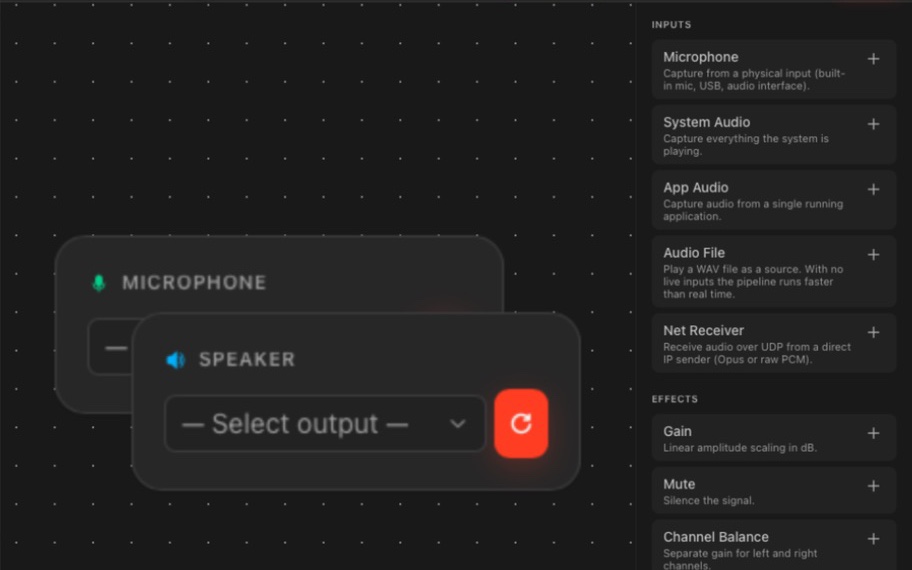
4ALL Signal routing translated language lanes to local outputs

What it is

A production workflow designed around the audience.

Begin by defining whether the audience needs language translation, assistive listening, or both. Those functions are not interchangeable: translated audio changes the spoken language, while assistive listening improves access to an audio signal for people with hearing loss. The venue or production supplier must specify the input, levels, connectors, transmission system, receivers, coverage, operations, and monitoring, then test the listener’s actual endpoint.

Best for

  • Production engineers routing configured LL-TTS language lanes to local audio outputs
  • Events using venue-owned receivers or headset-distribution systems
  • Multilingual conferences, town halls, festivals, and large venues
  • Teams comparing personal browser listening with a managed local listening path

Plan around

  • 4ALL Signal ends at documented local physical, virtual, or network audio outputs; it is not a transmitter, receiver, headset, amplifier, or venue coverage system.
  • No live translated-audio path is zero latency, and compatibility must be confirmed across every interface and listener endpoint.
  • Connecting translated audio to listening equipment does not itself establish accessibility or legal compliance and does not replace captions or human sign-language interpretation.

Capabilities and outputs

What the workflow actually delivers

The exact configuration depends on the event, audience destination, enabled features, and downstream production equipment.

Capabilities for How to route live translated audio to event headsets and assistive listening systems
CapabilityWhat it means in production
Translated language sourceReceive a configured low-latency translated speech language lane from the authorized 4ALL event.
Signal routing graphAssign language sources to documented physical, virtual, or supported network audio outputs.
Per-language outputKeep configured language lanes distinct so the venue can connect each output to the intended listening path.
Local monitoringObserve source, pipeline, DSP, output, device, jitter, underrun, and timing status in the production workflow.
Personal listening alternativeUse supported viewer controls when a configured event also offers spoken-language listening in a personal browser.

Production workflow

From source audio to a verified audience output

  1. Step 01

    Define the audience function

    Separate translation languages, assistive-listening needs, caption and human-ASL requirements, receiver quantities, and non-headset alternatives.

  2. Step 02

    Specify the venue handoff

    Confirm input type, connector, nominal level, channel format, interfaces, transmission equipment, receiver groups, coverage, power, sanitation, and operators.

  3. Step 03

    Configure the language route

    Enable the required LL-TTS source, authorize Signal, build one intentional output path per language, and set suitable levels and monitoring.

  4. Step 04

    Test at the listener endpoint

    Listen on representative venue-owned receivers throughout the coverage area and check language, level, intelligibility, delay, interference, backup, and staff handoff.

Questions buyers and producers ask

Frequently asked questions

Does 4ALL provide event headsets or wireless receivers?

No. 4ALL provides the configured translated-audio workflow and Signal’s local audio-routing handoff. The venue or production supplier provides and operates transmitters, receivers, headphones, amplifiers, interfaces, cabling, coverage, power, sanitation, and frequency coordination.

Can Signal connect to any assistive listening system?

Compatibility should never be assumed. The team must confirm the receiving system’s input, connector, level, channel format, interface, latency, and operating requirements, then test the complete path with the actual equipment.

Is a translation headset an assistive listening device?

Not necessarily. A headset may deliver a translated language, an assistive-listening feed, or another audio program. Translation and assistive listening address different needs even when they use similar distribution hardware.

Can attendees listen to translated audio on their phones?

When the relevant spoken option is enabled, supported 4ALL viewer controls can provide personal browser listening. The device, browser, access method, venue network, language, and fallback should be tested before use.

What should be tested before listeners receive headsets?

Test source audio, language selection, levels, end-to-end delay, every interface, receiver labeling, coverage, interference, battery or power procedures, sanitation, staff distribution, accessibility alternatives, and failure recovery.

Does this workflow guarantee ADA compliance?

No. Equipment and delivery are only part of an event-specific accessibility plan. Consult intended participants and qualified accessibility or legal professionals, and verify applicable requirements for the venue and program.
Plan the complete audience path before show time.

Start with a free workspace or talk with 4ALL about capacity, outputs, integrations, and production support.

Start for free