Human ASL workflow

Live ASL access for events

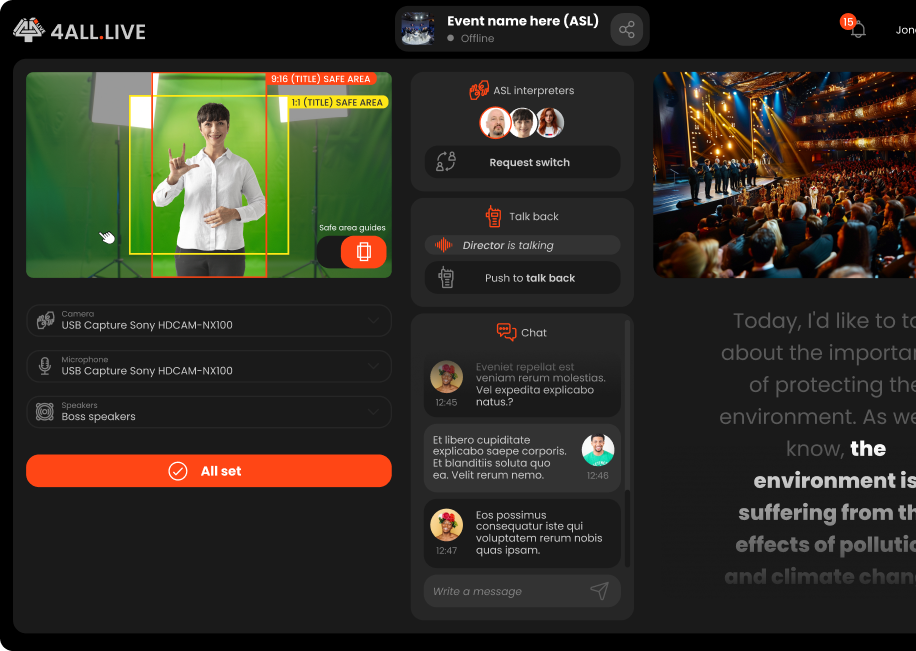
4ALL LIVE’s ASL workflow connects human interpreters to an operator-managed event and makes the interpreter video available through supported audience and production experiences. Viewers can use ASL picture-in-picture where enabled, while production teams configure interpreter readiness, video settings, private stage or talkback, program output, and recovery. It is not AI-generated sign language.

Start for free

Last updated

Human ASL interpreter video in the 4ALL LIVE audience experience

What it is

A production workflow, not a one-size-fits-all promise.

ASL access is a live video production workflow with human expertise at its center. The team should define interpreter and operator roles, confirm camera and lighting, establish communication, test the audience view, and prepare for device or network loss. Captioning and ASL can be offered together without treating one as a substitute for the other.

Best for

  • Events working with qualified human ASL interpreters
  • Audience experiences that combine captions and interpreter video
  • Remote or hybrid interpreter workflows with operator coordination
  • Productions needing an ASL program output for a selected destination

Plan around

  • 4ALL does not generate ASL with AI, avatars, or automatic text-to-sign conversion.
  • Interpreter qualifications, scheduling, linguistic decisions, and staffing remain human responsibilities.
  • Video quality depends on camera, lighting, framing, device, network, and production configuration.

Capabilities and outputs

What the workflow actually delivers

The exact configuration depends on the event, audience destination, enabled features, and downstream production equipment.

Capabilities for Live ASL access for events
CapabilityWhat it means in production
Human interpreter inputConnect an interpreter-managed camera workflow to an enabled 4ALL event.
Operator coordinationUse documented roles, readiness checks, private stage, and talkback practices.
Viewer picture-in-pictureOffer the human interpreter video in the supported audience viewer experience.
Program outputConfigure documented resolution, frame rate, background, layout, and egress settings for production use.
Recovery planningPrepare procedures for interpreter camera, device, audio, or network loss during the event.

Production workflow

From source audio to a verified audience output

  1. Step 01

    Staff the ASL workflow

    Assign qualified interpreters and the production roles responsible for readiness, switching, communication, and audience delivery.

  2. Step 02

    Prepare interpreter video

    Set up camera, lighting, framing, device permissions, audio communication, background, resolution, and frame rate.

  3. Step 03

    Enable the audience and program paths

    Configure viewer ASL access and any selected production output, then confirm captions remain available where planned.

  4. Step 04

    Rehearse normal and failure states

    Test handoffs, private communication, device loss, reconnection, and the final viewer or production destination.

Questions buyers and producers ask

Frequently asked questions

Does 4ALL use AI to generate ASL?

No. 4ALL’s documented ASL experience uses live human interpreters and an operator-managed video workflow. It does not claim automatic or avatar-generated ASL.

Can viewers see ASL and captions together?

Yes. When both experiences are enabled, the viewer can present captions with the human interpreter in a picture-in-picture experience.

What equipment does an interpreter need?

The production should provide a suitable camera, lighting, framing, supported device and browser access, stable network, and a rehearsed communication path. Exact equipment depends on the event design.

Can ASL video feed a production output?

4ALL documents ASL program output and egress settings. The production must configure and verify the selected downstream path for its own switcher, display, stream, or recording workflow.

Does ASL replace live captions?

No. ASL and captions serve different audience preferences and access needs. A production can offer them together and should not assume one is a universal substitute for the other.
Plan the complete audience path before show time.

Start with a free workspace or talk with 4ALL about capacity, outputs, integrations, and production support.

Start for free